
끄적끄적
CH 2. 기초 프로젝트 - 데이터 전처리 (2) 본문
사용하는 데이터
데이터 출처:
https://www.kaggle.com/datasets/gauravmalik26/food-delivery-dataset/data?select=train.csv
테이블 설명:
| 컬럼명 | 설명 | 데이터 타입 |
| ID | 주문 건 ID | object |
| Delivery_person_ID | Delivery Person 고유 ID | object |
| Delivery_person_Age | Delivery Person 나이 | object |
| Delivery_person_Ratings | Delivery Person 평점 (1 to 5) | object |
| Restaurant_latitude | Restaurant 위도 | float64 |
| Restaurant_latitude | Restaurant 경도 | float64 |
| Delivery_location_latitude | 배달 목적지 위도 | float64 |
| Delivery_location_longitude | 배달 목적지 경도 | float64 |
| Order_Date | 주문 날짜 | object |
| Time_Ordered | 주문 시간 | object |
| Time_Order_picked | 배달원이 음식 픽업한 시간 | object |
| Weather conditions | 기상상태 (Windy, Sunny, Cloudy, Stormy, Fog, Sandstoms 등) | object |
| Road_traffic_density | 배달 당시 도로 교통 상황 (Jam, High, Medium, Low) | object |
| Vehicle_condition | 배달 차량의 상태 (Smooth, good, average) | int64 |
| Type_of_order | 배달음식 종류 (Snack, Meal, Buffet, Drinks 등) | object |
| Type_of_vehicle | 배달 차량 종류 (motorbike, bicycle 등) | object |
| multiple_deliveries | 한 번에 배달원이 배당받은 배달 건수 | object |
| Festival | 당일에 축제가 있는지 여부 | object |
| City | 배달지역 도시화 정도 (Metropolitian, Urban 등) | object |
| Time_taken(min) | 배달에 걸린 시간 (분 단위) | object |
2025.06.13 - [[스파르타]내일배움캠프 데이터 분석 트랙] - 23일차 - 기초 프로젝트 데이터 전처리
23일차 - 기초 프로젝트 데이터 전처리
사용하는 데이터더보기데이터 출처: https://www.kaggle.com/datasets/gauravmalik26/food-delivery-dataset/data?select=train.csv 테이블 설명: 컬럼명설명데이터 타입ID주문 건 IDobject Delivery_person_IDDelivery Person 고유 ID ob
kminx.tistory.com
이전 전처리 과정에서 구한 식당과 배달지 간 거리가 도로망 기반이 아닌, 직선 거리 위주이기 때문에 도로망 기반 거리를 추가하는 방향으로 전처리를 다시 수행하였다.
1. Mapbox 기반 좌표간 거리 구하기
Mapbox API를 사용하면 일정 한도 내에서 무료로 좌표 간 거리, 예상 소요 시간을 얻을 수 있다.
이때의 거리는 실제 도로망을 따라 이동할 때 거리를 의미하며, (자동차, 자전거, 도보) 이렇게 3가지 수단 중 선택할 수 있다.
본 데이터에서 차량 타입을 살펴보면 motorcycle, scooter, electric scooter 이렇게 3가지 종류였으니 실제 도로망을 따라 '차'가 달리는 최단 거리와 소요 시간을 구하였다.
기존의 직선 거리 데이터도 일단 유지하였다.
import requests
import folium
# 1. Mapbox API 키
MAPBOX_TOKEN = 'pk.eyJ1Ijoia3VuZ21pbm5vIiwiYSI6ImNtYzBqZm14ZDAzNGcybW9kN21vamhidnYifQ.PWRnpTdxCAjJ0OE0MnOa0g'
def distance_time(Restaurant_longitude, Restaurant_latitude, Delivery_location_longitude,Delivery_location_latitude):
        # 2. 출발지(origin)와 도착지(destination) - (경도, 위도 순서로 Mapbox에 전달)
        origin = str(Restaurant_longitude) + ',' + str(Restaurant_latitude)
        destination = str(Delivery_location_longitude) + ',' + str(Delivery_location_latitude)
        # 3. Mapbox Directions API 요청 URL
        url = f"https://api.mapbox.com/directions/v5/mapbox/driving/{origin};{destination}"
        params = {
            "access_token": MAPBOX_TOKEN,
            "geometries": "geojson",  # 결과 경로 형식을 GeoJSON으로
            "overview": "full",       # 전체 경로 제공
            "steps": "true"           # turn-by-turn 경로 포함 (사용 안 해도 무방)
        }
        # 4. API 요청 및 응답 확인
        response = requests.get(url, params=params)
        data = response.json()
        # 5. 경로 좌표 추출
        coordinates = data['routes'][0]['geometry']['coordinates']  # 경도, 위도 순서
        # 6. 거리(m) 및 소요 시간(초) 추출 및 단위 변환
        distance_m = data['routes'][0]['distance']        # meters
        duration_s = data['routes'][0]['duration']        # seconds
        distance_km = distance_m / 1000                   # km 단위로 변환
        duration_min = duration_s / 60                    # 분 단위로 변환

        return round(distance_km,2) , round(duration_min,1)

def compute(row):
    d, t = distance_time(
        row['Restaurant_longitude'],
        row['Restaurant_latitude'],
        row['Delivery_location_longitude'],
        row['Delivery_location_latitude']
    )
    return pd.Series({'distance_route_km': d, 'duration_min': t})

df[['distance_route_km','duration_min']] = df.apply(compute, axis=1)
import geopy.distance
distances = pd.DataFrame()
distances['restaurant'] = pd.Series(zip(df['Restaurant_latitude'], df['Restaurant_longitude']))
distances['delivery'] = pd.Series(zip(df['Delivery_location_latitude'], df['Delivery_location_longitude']))
distances['distance'] = distances.apply(lambda x: geopy.distance.distance(x['restaurant'],x['delivery']).km,axis=1)
df['distance_straight_km']= round(distances['distance'],2)
추가로 예상 소요 시간과 실제 배달 시간을 비교해보았을 때, 아래와 같은 결과가 나왔다.
| 비교 | 결과 |
| 예상 소요 시간 >= 실제 시간 | 26,252 |
| 예상 소요 시간 < 실제 시간 | 12,037 |
일반적으로 소요 시간이 실제 배달 시간 보다 길게 나오는 것을 확인할 수 있었으며, '예상 소요 시간' - ' 실제 배달 시간' 데이터 컬럼을 추가하였다.
2. 새롭게 구한 데이터를 기준으로 속도(km/h)
새롭게 추가한 데이터를 기준으로 속도를 구하였다.
이때, 직선거리일 경우의 속도와 도로 기반 거리일 경우의 속도를 모두 계산하였다.
df['Speed_straight'] = round(df['distance_straight_km'] / (df['Time_taken(min)']/60),1)
df['Speed_route'] = round(df['distance_route_km'] / (df['Time_taken(min)']/60),1)
3. 이상치 제거하기
기존에 이상치는 직선 거리 기준 speed가 80이 넘는 데이터라고 파악했다.
그러나 이번엔 IQR을 사용해 이상치 기준을 제거고, 그거에 딱 맞게 이상치 데이터를 제거했다.
일반적으로 도로망 거리가 직선 거리보다 길기 때문에 직선 거리일 때의 속도가 더 느리게 나오는 것이 당연하기 때문이다.
다만, 약 250개의 데이터가 직선 거리가 도로 기반 거리보다 길게 나오는데, 원인은 파악하지 못 하였다.
둘 다 모듈을 사용해서 계산했기 때문에 일단 해당 데이터는 이상치로 판단하지 않고, 남겨두었다.
r_q1 = df['Speed_route'].quantile(0.25)
r_q3 = df['Speed_route'].quantile(0.75)
r_iqr = (r_q3-r_q1) * 1.5

s_q1 = df['Speed_straight'].quantile(0.25)
s_q3 = df['Speed_straight'].quantile(0.75)
s_iqr = (s_q3-s_q1) * 1.5

drop_idx = df[(df['Speed_straight'] > (s_q3 + s_iqr)) | (df['Speed_straight'] < (s_q1 - s_iqr)) | (df['Speed_route'] > (r_q3 + r_iqr)) | (df['Speed_route'] < (r_q1 - r_iqr))].index
df = df.drop(index= list(drop_idx)).reset_index(drop=True)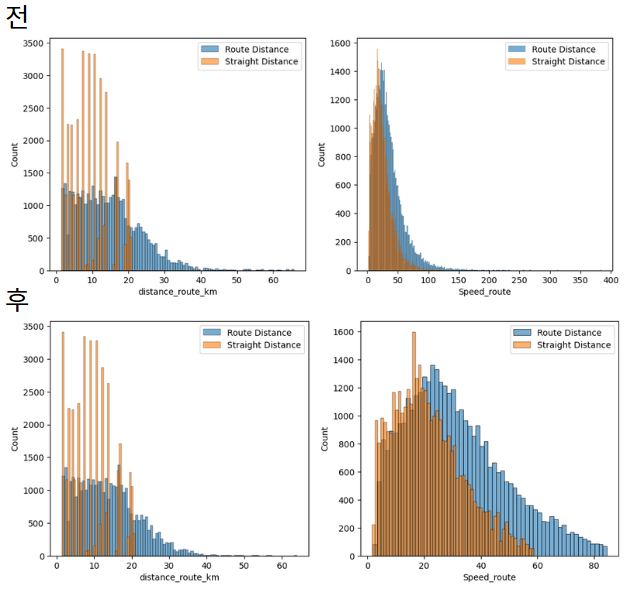
4. 도시 지명 추가하기
reverse_geocoder는 오프라인으로 위경도 좌표 입력 시, 가장 가까운 도시/지역명을 반환해주는 패키지이다.
이것을 사용하여 배달지와 식당의 도시,마을 이름을 추가하였다.
import reverse_geocoder as rg

coords_r = list(zip(df['Restaurant_latitude'], df['Restaurant_longitude']))
coords_d = list(zip(df['Delivery_location_latitude'], df['Delivery_location_longitude']))

infomation_r = rg.search(coords_r)
infomation_d = rg.search(coords_d)

df['restaurant_city'] = [n['name'] for n in infomation_r]
df['destination_city'] = [n['name'] for n in infomation_d]'[스파르타]내일배움캠프 데이터 분석 트랙 > Project' 카테고리의 다른 글
| CH 2. 기초 프로젝트 - 최종 정리 (1) | 2025.06.23 |
|---|---|
| CH 2. 기초 프로젝트 - 데이터 분석 (2) (2) | 2025.06.19 |
| CH 2. 기초 프로젝트 - 데이터 분석 (1) (3) | 2025.06.17 |
| CH 2. 기초 프로젝트 - 데이터 전처리 (1) (0) | 2025.06.13 |
| 22일차 - 공모전 준비 (QGIS 격자 기반 분석) (0) | 2025.06.12 |


